Friday, October 29, 2021

Photoshop Videos


Photoshop Tools


https://youtu.be/2cQT1ZgvgGI

Eyedropper Tool:

The eyedropper tool is going to be a very useful tool within photoshop. It allows you to pick up a color off of the image. Instead of trying to find a color in the color wheel, the eyedropper directly selects a color you click on in the image. This will be a very easy tool to use and doesn't require much skill to use. You can store colors you pick up with the eyedropper tool in your color palette and use the eyedropper tool to fill in areas with a specific color.


https://youtu.be/2cQT1ZgvgGI

Healing Brush Tool:

The healing brush tool lets you cover up any unwanted areas. It takes an existing part of the image and you can basically lay it on top of another area. For example in the video/image above, he wanted to cover the reflection of the person in the video so with the healing brush tool he will select a part of the water where there is no reflection and place it on top of the reflection of the person to cover it. And then he can proceed to blend it in and make it look like that person was never there. I feel like this tool can be a little difficult to use at first for a beginner, but with practice it can definitely be very useful to clean up any images.


https://youtu.be/2cQT1ZgvgGI

Blur Tool:

The blur tool can be used to blur out any unwanted areas in a photo. For example in the video.image above, he blurred out the mans face because he did not want it to be prevalent in the image. It can be used to blur out both big or small details. I think the blur tool is a pretty beginner user friendly tool. It can be useful when working within photoshop. The blur tool can also be used to possibly add some dimension and texture into images.


Thursday, October 28, 2021

Self Portrait


Self Portrait

My self portrait took me about 4 hours to do. The outlining was pretty easy for the most part but I struggled a bit with connecting some of the lines. The coloring took a little longer than the outlining just because there were more areas to fill in. Figuring out where to put the shadows and highlights was a little difficult too because I didn't want the placement or colors to look awkward. The most difficult part for me was the hair. I used multiple strands of hair with different colors, lengths, widths, and opacities to add depth and texture since my hair was a little wavy in the original photo. And then for the propaganda I chose "Love Yourself First" because I am a firm believer in yourself always coming first. You can't love other people before you love yourself, and I am big on self love. And I put little hearts around the poster to represent love. Overall, I am pretty happy with how my self portrait turned out!


Logo


Logo

For my logo I chose to do a beach aesthetic with waves and the night sky filled with the moon and stars. I chose to do this because I love the beach, hence why I moved from Illinois to Florida. The beach is one of my safe places. Along with the nighttime. The nighttime is when I am the most energetic, happy, and productive. The beach at night is the perfect combo. I also really love the sky in general. I love cloud gazing and star gazing. Looking at the constellations is really relaxing. My favorite logo out of the four is the bottom left corner. I feel like I chose darker colors, specifically blues and purples because those give off a more relaxing tone/mood. And then I chose to make the moon a yellow/orange color to give some contrast to the rest of the colors in the logo. The white stars give contrast against the dark blue, almost black, sky. The logo took me about 2 hours to make because I knew exactly what I wanted to do and wasn't too complicated to make, just a lot of curves for the waves. The stars were a little difficult to make but I think they turned out decent. Overall, I am really happy with how this logo turned out!


Monday, October 18, 2021

Dear Future Nicole


Dear future Nicole, I hope you are doing well and living your best life. I am writing to you 20 years in the

future from now. By now, you would be 38 years old. Hopefully you made it through

college and if not I hope you are working a job or two that you really enjoy and making

money to travel. I wonder if you made it through college and went on to vet school to

become a successful veterinarian like you always dreamt of as a child or if you chose a

different path along the way. Either way, you hopefully have gotten to travel to new cities,

states, countries, and many new places. Maybe taken a few road trips and flights to go out

and explore. Some places you always wanted to visit were Greece, Aruba, Bali, Italy, and

many more. So, I hope those are all crossed off your bucket list of places to travel to!

I wonder if you actually found someone you are interested in and have a possible family.

You could be married and have one or two kids along with one to three dogs like you

wanted. Maybe you have a beautiful home located near a beach like you always dreamt

of having. I hope you continued to take photos of all the places you’ve gone to and seen

and continued your small hobby of videography of all your trips to be able to look back

on. Those were always my favorite! If being a veterinarian didn’t work out, then what

path did you go down. What career did you go into and do you enjoy it or them? I hope

you are living your best life like you always wanted and are getting to explore so many new parts of the world. Traveling has always been your main goal and priority in life,

so I hope that is what you have been able to accomplish in the last 20 years. 


My calligram is in the shape of a plane. My letter to my future self reflected how I hopefully got to travel the world within the next 20 years of my life. My future plans are to get a job or two and work a ton to save up as much money as possible to be able to buy myself an apartment or house, a new car, and be able to go out and explore. I want to experience everything the world has to offer and not be stuck in one place my whole life. I want to travel and experience all of this while I am still young. So, in my future letter I cover my hopes of achieving all those goals and dreams the past 20 years. I was debating choosing between a van and/or a plane as my image. I went with a plane because I have plans of possibly becoming a flight attendant to pursue my dreams of traveling. 


I used the curve tool a lot for a few different parts of the plane in the image. The curve tool is one of my favorite tools because it helps make the image not look so boxy and rectangular. Adding curves gives the image more depth and character. A lot of the curves were incorporated in the clouds surrounding the plane also. 


Tuesday, October 5, 2021

Illustrator Videos


The Curvature Tool

https://www.youtube.com/watch?v=XnJByIkcUS0 


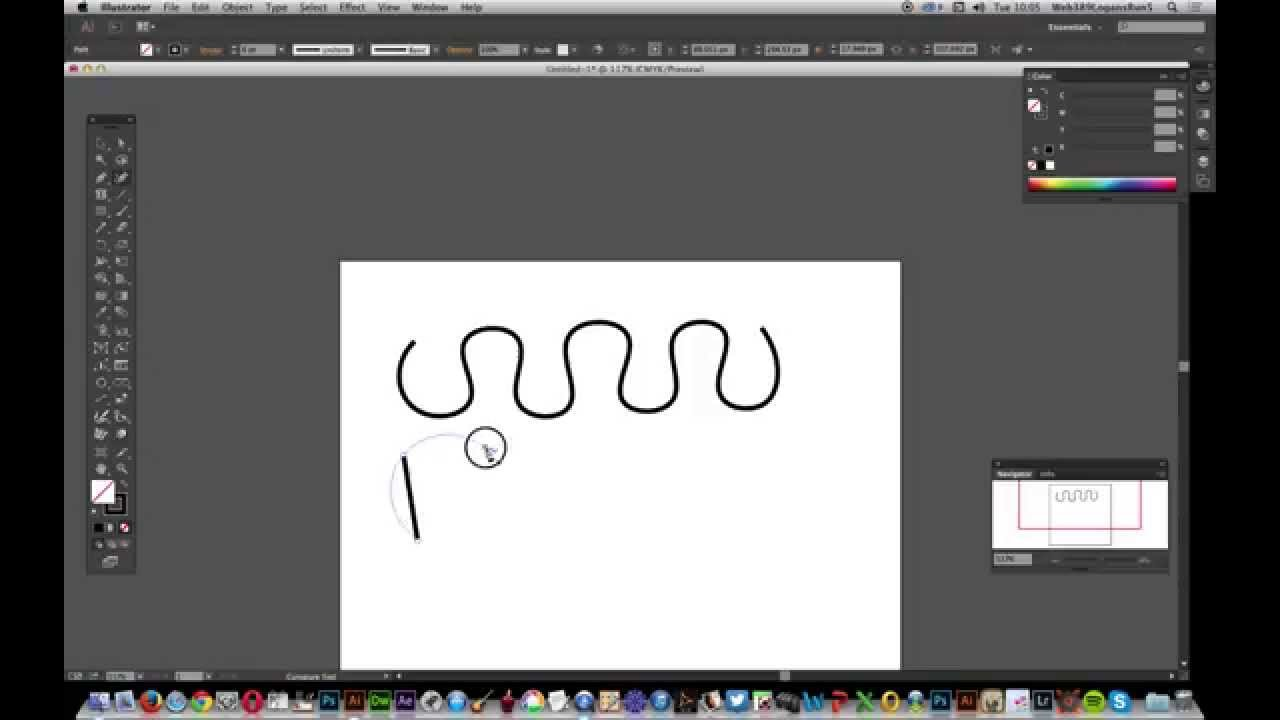
The curvature tool is going to be a very important tool that is going to be used often. I think it will be pretty hard to use at first and will be a bit of a learning process. There are many different types of curves you can make. They can vary in length, the amount of curves, etc. This tool can be used to round out any corners, get rid of harsh lines, and just make those curved lines needed for images. Curves add more depth and character to your projects instead of just having plain, straight lines. The curvature tool allows you to be more creative and use it in more ways. This video, specifically talking about the curvature tool, was interesting to watch because it shows how many options there are of using the tool. There are so many different ways to use the tool to create your image. 


The Blend Tool

https://www.youtube.com/watch?v=-JjR4XNJ-eo 


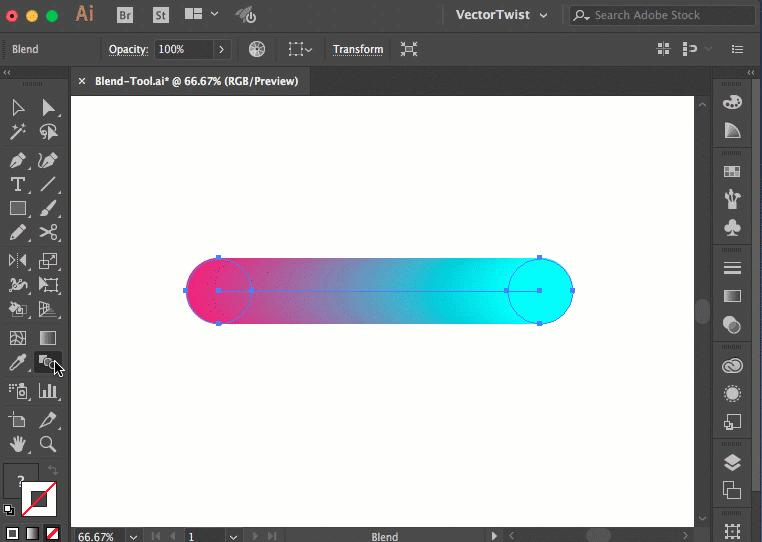
The blend tool is going to be an essential and heavily used tool within Illustrator. It will allow you to play around with colors and different gradients. This tool is going to be used within your projects to create more depth and uniqueness in your images. Blends are very important to know how to use and should be used to your advantage. The blend tool can be used to get rid of sharp lines or get rid of boring, plain solid colors. What I found interesting about this video is how the blend tool can be incorporated in your art. It can be used for backgrounds or to fill in certain shapes. The choices are endless with the blend tool.


The Eraser Tool

 https://www.youtube.com/watch?v=GnWTaBfK3c4 


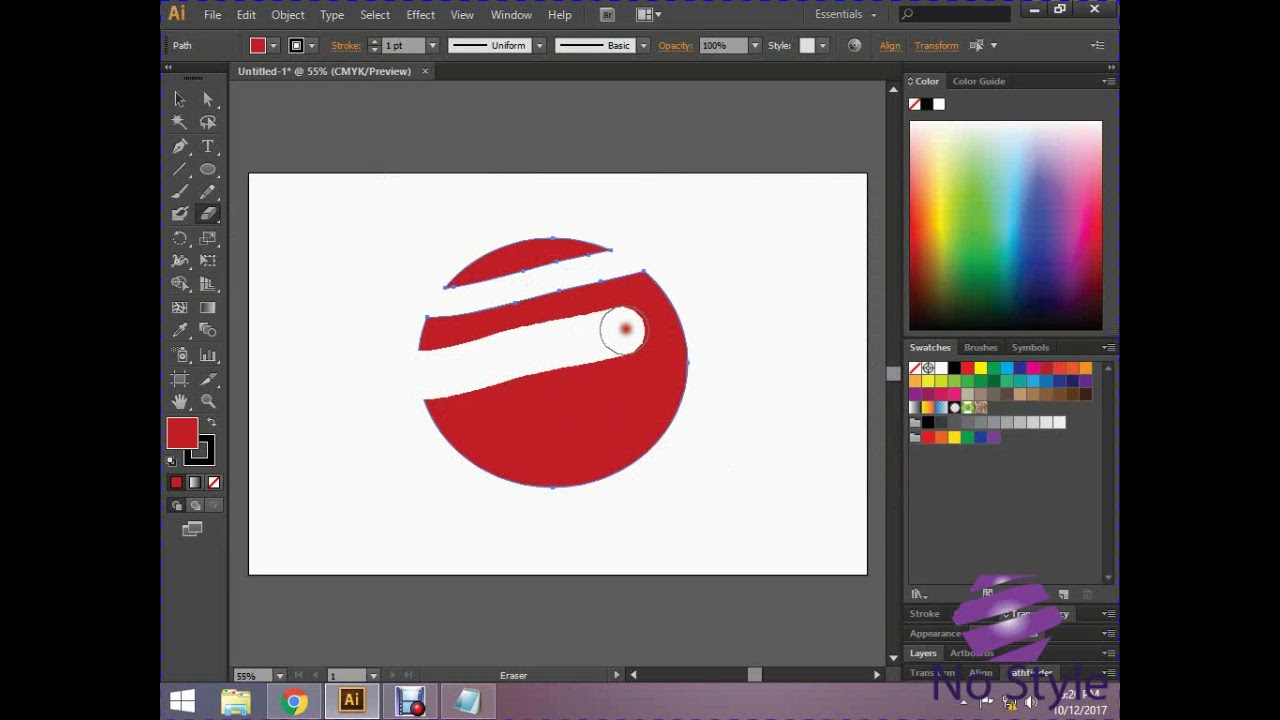
The eraser tool is going to be one of the key tools in the whole illustrator application. The eraser tool can serve different functions. Of course it can be used to erase any mistakes, but can also be used to clean up your art and be used to make purposeful void spaces in your art. The eraser tool also gives you the option to change the sizing of the tool. You can make the eraser super small to be more precise or super big to erase a bigger general area. Although this tool is very basic and simple, it is one of the essential tools that are going to be used very often.


Tuesday, September 28, 2021

Canvas Project


 Blossom; Powerpuff Girl


by: Nicole Nowak

I was able to create the main character, Blossom, from The Powerpuff Girls in Dreamweaver using HTML Canvas. My image consists of various shapes including rectangles, circles, half circles, arcs, bezier curves, hearts, lines, and more. Each being different sizes, colors, etc. I chose Blossom because I wanted to do a cartoon character from a show I used to watch, and Blossom just seemed like a fun character to recreate. I wanted to do all three characters, including Bubbles and Buttercup, but that would have taken me triple the amount of time I spent, so I just chose Blossom alone. This project took me about 10 hours to complete over the span of a few days. 


Using Dreamweaver is very fun and is a great creative outlet, but can get very frustrating to work with. There were things I did not know how to recreate in Dreamweaver so I had to get creative. It was a lot of just playing around with the application. As I got further into my project, it started to become a little bit easier each time. Practice makes perfect. I kept a picture of my image open on my phone while I worked on the code on my laptop. That way I can look right over to make sure my measurements and placements line up. Overall, I am pretty content with how my project came out. There’s definitely things I can work on and improve on, but for a first time Dreamweaver user and coder, I think it is for sure a start!


Time Spent: 10 hours


Inspiration


Sketch


Code

//Background

var y = 0;
var x = 0;
var width = canvas.width;
var height = canvas.height;
context.beginPath();
context.rect(x, y, width, height);
context.fillStyle = 'rgba(170,221,255,1.00)';
context.fill();

//Heart Pink and Blue var Ax = 400; var Ay = 125; var Bx = 400; var By = 650; var control1x = 100; var control1y = -150; var control2x = -350; var control2y = 215; var control3x = 1150; var control3y = 215; var control4x = 700; var control4y = -150; context.beginPath(); context.moveTo(Ax, Ay); context.bezierCurveTo(control1x, control1y, control2x, control2y, Bx, By); context.bezierCurveTo(control3x, control3y, control4x, control4y, Ax, Ay); context.lineWidth = 50; // line color context.strokeStyle = 'rgba(242,74,143,1.00)'; context.lineCap = 'round'; context.stroke(); context.fillStyle = 'rgba(90,162,245,1.00)'; context.fill();   //Heart Green and Blue var Ax = 400; var Ay = 185; var Bx = 400; var By = 580; var control1x = 125; var control1y = -100; var control2x = -225; var control2y = 215; var control3x = 1025; var control3y = 215; var control4x = 675; var control4y = -100; context.beginPath(); context.moveTo(Ax, Ay); context.bezierCurveTo(control1x, control1y, control2x, control2y, Bx, By); context.bezierCurveTo(control3x, control3y, control4x, control4y, Ax, Ay); context.lineWidth = 50; // line color context.strokeStyle = 'rgba(26,130,28,1.00)'; context.lineCap = 'round'; context.stroke(); context.fillStyle = 'rgba(183,228,248,1.00)'; context.fill(); //Pink trail context.beginPath(); context.moveTo(400,580) context.lineTo(500, 518); context.lineTo(450,200) context.lineTo(350,200); context.lineTo(300,518) context.lineTo(400, 580); context.fillStyle = 'rgba(234,93,191,1.00)'; context.lineWidth = 20; // STROKE WIDTH context.strokeStyle = 'rgba(234,93,191,1.00)'; context.fill(); context.stroke(); // STROKE //Hair in Back var x = 355; var y = 275; var controlX = 365; var controlY = 370; var x1 = 335; var y1 = 335; var controlX1 = 400; var controlY1 = 460; var x2 = 465; var y2 = 335; var controlX2 = 435; var controlY2 = 370 var x3 = 445; var y3 = 275; context.beginPath(); context.moveTo(x, y); context.quadraticCurveTo(controlX, controlY, x1, y1); context.quadraticCurveTo(controlX1, controlY1, x2, y2); context.quadraticCurveTo(controlX2, controlY2, x3, y3); context.fillStyle = 'rgba(255,132,27,1.00)'; context.fill(); context.lineWidth = 2; context.strokeStyle = "black"; context.stroke(); context.beginPath(); context.moveTo(365,360) context.lineTo(360, 374); context.lineWidth = 2; // STROKE WIDTH context.strokeStyle = 'black'; context.stroke(); // STROKE context.beginPath(); context.moveTo(400,384) context.lineTo(400, 397); context.lineWidth = 2; // STROKE WIDTH context.strokeStyle = 'black'; context.stroke(); // STROKEcontext.beginPath(); context.moveTo(435,360) context.lineTo(440, 374); context.lineWidth = 2; // STROKE WIDTH context.strokeStyle = 'black'; context.stroke(); // STROKE //Left Arm var x = 375; var y = 280; var controlX = 360; var controlY = 305; var x1 = 340; var y1 = 290; var controlX1 = 340; var controlY1 = 325; var x2 = 375; var y2 = 310; context.beginPath(); context.moveTo(x, y); context.quadraticCurveTo(controlX, controlY, x1, y1); context.quadraticCurveTo(controlX1, controlY1, x2, y2); context.fillStyle = 'rgba(244,230,207,1.00)'; context.fill(); context.lineWidth = 2; context.strokeStyle = "black"; context.stroke(); //Right Arm var x = 460; var y = 165; var controlX = 470; var controlY = 100; var x1 = 470; var y1 = 100; var controlX1 = 510; var controlY1 = 120; var x2 = 470; var y2 = 190; context.beginPath(); context.moveTo(x, y); context.quadraticCurveTo(controlX, controlY, x1, y1); context.quadraticCurveTo(controlX1, controlY1, x2, y2); context.fillStyle = 'rgba(244,230,207,1.00)'; context.fill(); context.lineWidth = 2; context.strokeStyle = "black"; context.stroke(); //Body var rectx2 = 375; var recty2 = 285; var rectwidth2 = 45; var rectheight2 = 50; context.beginPath(); context.rect(rectx2,recty2,rectwidth2,rectheight2); context.lineWidth = 2; context.strokeStyle = 'rgba(0,0,0,1.00)'; context.fillStyle = 'rgba(234,93,191,1.00)'; context.fill(); context.stroke(); //Rectangle on Shirt var rectx2 = 375; var recty2 = 300; var rectwidth2 = 45; var rectheight2 = 20; context.beginPath(); context.rect(rectx2,recty2,rectwidth2,rectheight2); context.lineWidth = 2; context.strokeStyle = 'rgba(0,0,0,1.00)'; context.fillStyle = 'rgba(0,0,0,1.00)'; context.fill(); context.stroke(); //Right Leg var rectx2 = 395; var recty2 = 335; var rectwidth2 = 25; var rectheight2 = 30; context.beginPath(); context.rect(rectx2,recty2,rectwidth2,rectheight2); context.lineWidth = 2; context.strokeStyle = 'rgba(0,0,0,1.00)'; context.fillStyle = 'rgba(255,255,255,1.00)'; context.fill(); context.stroke(); //Left Leg var rectx2 = 375; var recty2 = 315; var rectwidth2 = 25; var rectheight2 = 25; context.beginPath(); context.rect(rectx2,recty2,rectwidth2,rectheight2); context.lineWidth = 2; context.strokeStyle = 'rgba(0,0,0,1.00)'; context.fillStyle = 'rgba(255,255,255,1.00)'; context.fill(); context.stroke(); //Top of Left Shoe var rectx2 = 375; var recty2 = 340; var rectwidth2 = 25; var rectheight2 = 10; context.beginPath(); context.rect(rectx2,recty2,rectwidth2,rectheight2); context.lineWidth = 2; context.strokeStyle = 'rgba(0,0,0,1.00)'; context.fillStyle = 'rgba(0,0,0,1.00)'; context.fill(); context.stroke(); //Tip of Left Shoe var centerX = 387.5; var centerY = 350 var radius = 13.5; var startangle = 0* Math.PI;; var endangle = 1* Math.PI; context.beginPath(); context.arc(centerX, centerY, radius, startangle, endangle, false); context.fillStyle = "black"; context.fill(); context.lineWidth = 5; //White Tip of Left Shoe var centerX = 387.5; var centerY = 347 var radius = 8; var startangle = 0* Math.PI;; var endangle = 1* Math.PI; context.beginPath(); context.arc(centerX, centerY, radius, startangle, endangle, false); context.fillStyle = "white"; context.fill(); context.lineWidth = 5; //Bow var Ax = 400; var Ay = 150; var Bx = 400; var By = 150; var control1x = 400; var control1y = -150; var control2x = 255; var control2y = 200; var control3x = 545; var control3y = 200; var control4x = 400; var control4y = -150; context.beginPath(); context.moveTo(Ax, Ay); context.bezierCurveTo(control1x, control1y, control2x, control2y, Bx, By); context.bezierCurveTo(control3x, control3y, control4x, control4y, Ax, Ay); context.lineWidth = 4; // line color context.strokeStyle = 'black'; context.lineCap = 'round'; context.stroke(); context.fillStyle = 'rgba(221,61,38,1.00)'; context.fill();     //Center of Bow var centerX = 400; var centerY = 140 var radius = 12; var startangle = 0* Math.PI;; var endangle = 1* Math.PI; context.beginPath(); context.arc(centerX, centerY, radius, startangle, endangle, true); context.lineWidth = 4; context.strokeStyle = "rgba(0,0,0,1.00)"; context.stroke(); context.fillStyle = 'rgba(221,61,38,1.00)'; context.fill(); //Head var centerX = 400; var centerY = 215; var radius = 75; var startangle = 0; var endangle = 2 * Math.PI; context.beginPath(); context.arc(centerX, centerY, radius, startangle, endangle, false); context.lineWidth = 4; context.strokeStyle = "rgba(0,0,0,1.00)"; context.stroke(); context.fillStyle = "rgba(244,230,207,1.00)"; context.fill(); //Mouth var x = 415; var y = 235; var controlX = 400; var controlY = 245; var x1 = 385; var y1 = 235; var controlX1 = 400; var controlY1 = 285; var x2 = 415; var y2 = 235; context.beginPath(); context.moveTo(x, y); context.quadraticCurveTo(controlX, controlY, x1, y1); context.quadraticCurveTo(controlX1, controlY1, x2, y2); context.fillStyle = 'rgba(137,50,65,1.00)'; context.fill(); context.lineWidth = 2; context.strokeStyle = "black"; context.stroke(); //Tongue var centerX = 400; var centerY = 255 var radius = 2; var startangle = 0* Math.PI;; var endangle = 1* Math.PI; context.beginPath(); context.arc(centerX, centerY, radius, startangle, endangle, true); context.fillStyle = "rgba(209,98,122,1.00)"; context.fill(); context.lineWidth = 5; context.strokeStyle = "rgba(209,98,122,1.00)"; context.stroke(); //Left Eye //White var centerX = 351; var centerY = 215; var radius = 27; var startangle = 0; var endangle = 2 * Math.PI; context.beginPath(); context.arc(centerX, centerY, radius, startangle, endangle, false); context.lineWidth = 3; context.strokeStyle = "black"; context.stroke(); context.fillStyle = "white"; context.fill(); //Pink var centerX = 353.5; var centerY = 212; var radius = 14; var startangle = 0; var endangle = 2 * Math.PI; context.beginPath(); context.arc(centerX, centerY, radius, startangle, endangle, false); context.lineWidth = 20; context.strokeStyle = "rgba(252,164,203,1.00)"; context.stroke(); context.fillStyle = "rgba(252,164,203,1.00)"; context.fill(); //Black var centerX = 358; var centerY = 210; var radius = 18; var startangle = 0; var endangle = 2 * Math.PI; context.beginPath(); context.arc(centerX, centerY, radius, startangle, endangle, false); context.lineWidth = 3; context.strokeStyle = "black"; context.stroke(); context.fillStyle = "black"; context.fill(); //White var centerX = 362; var centerY = 204; var radius = 7; var startangle = 0; var endangle = 2 * Math.PI; context.beginPath(); context.arc(centerX, centerY, radius, startangle, endangle, false); context.lineWidth = 3; context.strokeStyle = "white"; context.stroke(); context.fillStyle = "white"; context.fill(); //Right Eye //White var centerX = 449; var centerY = 215; var radius = 27; var startangle = 0; var endangle = 2 * Math.PI; context.beginPath(); context.arc(centerX, centerY, radius, startangle, endangle, false); context.lineWidth = 3; context.strokeStyle = "black"; context.stroke(); context.fillStyle = "white"; context.fill(); //Pink var centerX = 446.5; var centerY = 212; var radius = 14; var startangle = 0; var endangle = 2 * Math.PI; context.beginPath(); context.arc(centerX, centerY, radius, startangle, endangle, false); context.lineWidth = 20; context.strokeStyle = "rgba(252,164,203,1.00)"; context.stroke(); context.fillStyle = "rgba(252,164,203,1.00)"; context.fill(); //Black var centerX = 442; var centerY = 210; var radius = 18; var startangle = 0; var endangle = 2 * Math.PI; context.beginPath(); context.arc(centerX, centerY, radius, startangle, endangle, false); context.lineWidth = 3; context.strokeStyle = "black"; context.stroke(); context.fillStyle = "black"; context.fill(); //White var centerX = 438; var centerY = 204; var radius = 7; var startangle = 0; var endangle = 2 * Math.PI; context.beginPath(); context.arc(centerX, centerY, radius, startangle, endangle, false); context.lineWidth = 3; context.strokeStyle = "white"; context.stroke(); context.fillStyle = "white"; context.fill(); //Top of Right Shoe var rectx2 = 395; var recty2 = 365; var rectwidth2 = 25; var rectheight2 = 10; context.beginPath(); context.rect(rectx2,recty2,rectwidth2,rectheight2); context.lineWidth = 2; context.strokeStyle = 'rgba(0,0,0,1.00)'; context.fillStyle = 'rgba(0,0,0,1.00)'; context.fill(); context.stroke(); //Tip of Right Shoe var centerX = 407.5; var centerY = 375 var radius = 13.5; var startangle = 0* Math.PI;; var endangle = 1* Math.PI; context.beginPath(); context.arc(centerX, centerY, radius, startangle, endangle, false); context.fillStyle = "black"; context.fill(); context.lineWidth = 5; //White Tip of Right Shoe var centerX = 407.5; var centerY = 372 var radius = 8; var startangle = 0* Math.PI;; var endangle = 1* Math.PI; context.beginPath(); context.arc(centerX, centerY, radius, startangle, endangle, false); context.fillStyle = "white"; context.fill(); context.lineWidth = 5; //Hair Outline var x = 330; var y = 185; // control point coordinates ( magnet ) var cpointX = canvas.width / 2 - 0; var cpointY = canvas.height / 2 - 212; // ending point coordinates var x1 = 470; var y1 = 185; context.beginPath(); context.moveTo(x, y); context.quadraticCurveTo(cpointX, cpointY, x1, y1); context.lineTo(330, 185); context.lineTo(350, 185); context.lineTo(363, 168); context.lineTo(363, 185); context.lineTo(385, 185); context.lineTo(400, 160); context.lineTo(415, 185); context.lineTo(437, 185); context.lineTo(437, 168); context.lineTo(450, 185); context.lineTo(470, 185); context.fillStyle = "rgba(255,132,27,1.00)"; context.fill(); context.lineWidth = 2; context.strokeStyle = "black"; context.stroke();


Monday, September 6, 2021

The World Wide Web and the Internet


 The World Wide Web and the Internet

What is the Internet? The internet is a wider network that allows computer networks around the world run by companies, governments, universities, and other organizations to talk to one another. This allows

for digital information to travel around the world. The internet was created by Tim Berners-Lee, a British

computer scientist. By October of 1990 Tim had written the three fundamental technologies that remain the

foundation of today’s web. He created the internet because he noticed there was difficulty trying to share

information which was what it was originally used for, to be able to share information easier among networks. Today the internet

is used for a vast variety of things, entertainment, communication, information, etc.

What is the World Wide Web? Commonly referred to as WWW, W3, or the Web, the World Wide Web is an interconnected system

of public web pages accessible through the Internet. Tim Berners-Lee proposed the architecture of what became known as the World Wide Web. He created the

first web server, web browser and webpage on his computer at the CERN physics research lab in 1990. He also founded the W3C (World Wide Web Consortium) to standardize and develop the Web further. The World Wide Web is the primary tool billions of people use to interact on the Internet. 


Are the Internet and the World Wide Web the same thing?

Although the Internet and the World Wide Web are very similar, they are not the same concept. 
The Web is not the same as the Internet: the Web is one of many applications built on top of the Internet.
The World Wide Web are the pages you see when you're at a device and you're online. But the internet is
the network of connected computers that the web works on, as well as what emails and files travel across.
The World Wide Web is just one common area for information exchange, facilitated by the Internet. You
connect to this Internet to access the Web, but the Internet is just the connection between countless,
separate servers, computers, and devices. The Web is the medium we use to access, edit, discover, and
share information (through links) according to a standard language: HTML. 


The first web page! The first web page went live on August 6, 1991 and was made by Tim Berners-Lee. The first web page address was http://info.cern.ch/hypertext/WWW/TheProject.html.


Work Cited

https://www.theguardian.com/technology/2018/oct/22/what-is-the-internet-13-key-questions-answered

https://webfoundation.org/about/vision/history-of-the-web/?gclid=Cj0KCQjw-NaJBhDsARIsAAja6dN5EjrqoJYJb_OHeVZOJk1tPI3nc5ghjLK9NIlbUtTXLjQtrPnAQ2caAp2dEALw_wcB

https://developer.mozilla.org/en-US/docs/Glossary/World_Wide_Web

https://www.bbc.co.uk/newsround/47523993

https://www.pageonepower.com/linkarati/difference-between-internet-world-wide-web

https://www.businessinsider.com/flashback-this-is-what-the-first-website-ever-looked-like-2011-6